Latency as a Product Feature
Speed is not a constraint you tolerate; it is something users feel, and small models let you design it on purpose.

Research spine: this chapter stays grounded in DistilBERT result and FrugalGPT work, then applies that evidence to the operating judgment in the book. In a design review for a code-completion feature, the debate was entirely about quality. Which model produced the best completions, which prompt got the cleanest suggestions, how to handle multi-line edits. Nobody was talking about speed until an engineer who had used the prototype said something that ended the meeting early: "It does not matter how good the suggestion is if it shows up after I have already typed the line." The best completion in the world, arriving 800 milliseconds late, is worse than a mediocre completion that arrives in 40. For that feature, latency was not a constraint on the product. Latency was the product. A slow autocomplete is not a slow good feature, it is a broken one.
This chapter is about treating latency as something you design rather than something you measure and apologize for, and about why small models are often the only way to hit the latency a good experience requires. The frontier-model reflex optimizes for the quality you can see in a demo and ignores the speed you can only feel in use. Real users feel the speed first.
Where latency comes from
To design latency you have to know what you are spending it on. For a typical model-backed feature served over a network, the end-to-end time the user experiences breaks down roughly into:
- Network round trip to wherever the model lives. If the model is in a different region or a different company's cloud, this can dominate and you cannot optimize it away with a faster model - which is one reason Privacy, Local Inference, and Data Residency finds that keeping the model inside your own walls often wins on latency as a side effect.
- Queueing and scheduling time the request waits before the model starts working on it, which depends on load and batching.
- Time to first token (TTFT), how long until the model produces its first output token, which is dominated by processing the input (the prefill).
- Time per output token, the generation speed, which for a memory-bound model depends heavily on model size and quantization.
- Total output length, because each token costs time; a model that emits a 200-word explanation is slower than one that emits a label, even at the same per-token speed.
The breakdown matters because it tells you which lever to pull. If network round trip dominates, the answer is to move the model closer, which often means a small model you can run locally or at the edge, because you cannot self-host a frontier model on a phone. If generation speed dominates, the answer is a smaller or quantized model. If output length dominates, the answer is to constrain the output, which we have already seen is also a cost and reliability win. Latency optimization and right-sizing are the same project viewed from a different angle.
Tail latency is the real metric
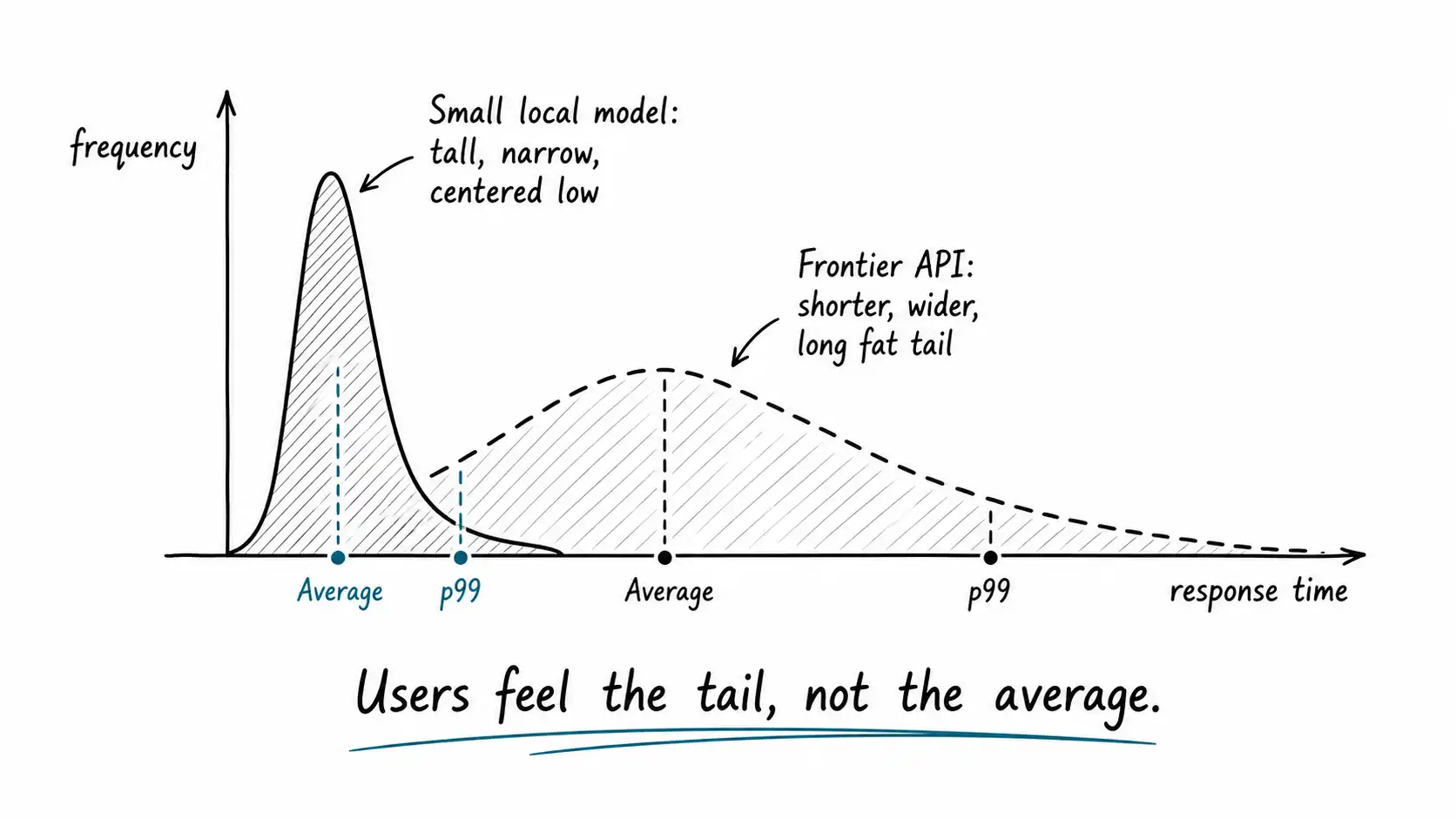
The single most common latency mistake is reporting the average. The average is a comforting number that hides the requests that ruin the experience. What users remember and complain about is the slow requests, the p95 and p99, the one time in twenty or one time in a hundred that the thing hung. A feature with a 100-millisecond average and a 2-second p99 feels broken to the unlucky users who hit the tail, and at scale, every user hits the tail regularly.
Large models make the tail worse in specific ways. They are slower per token, so a long output is slower in absolute terms. They are more sensitive to load, so under traffic spikes their queueing time balloons. And shared frontier APIs add rate-limiting and noisy-neighbor variance you do not control. A small model you run yourself has a tighter, more predictable latency distribution, which is often worth more to the experience than a higher average quality, because predictability is something users can trust and unpredictability is something they learn to dread.
So when you set a latency target, set it at the tail. "p99 under 150 milliseconds" is a real product specification. "Average around 100 milliseconds" is a number that will betray you. Designing to the tail almost always pushes you toward smaller, more local, more predictable models, which is the chapter's quiet thesis.
The latency budget
The practical artifact here is a latency budget, and it works exactly like a financial budget: you decide the total you can spend, then allocate it across the components, and any component that wants more has to take it from another. Setting the total first, from the user experience backward, is what keeps latency from being an afterthought.
Start from the experience. How fast must the feature respond to feel right? Autocomplete needs to beat human typing, so tens of milliseconds. A search-as-you-type needs to feel instant, so under 200 milliseconds. A chat response can take a second or two if it streams, because streaming lets the user start reading before generation finishes. A background batch job can take minutes because no one is waiting. The acceptable total is a product decision, and it varies enormously by feature.
Then allocate. A hypothetical budget for a search-as-you-type feature with a 200-millisecond p99 target:
| Component | Budget (p99) | Notes |
|---|---|---|
| Network round trip | 40 ms | Keep the model in-region or local |
| Queueing | 20 ms | Provision for peak, not average |
| Embedding the query | 15 ms | Small embedding model |
| Vector search | 25 ms | Indexed nearest-neighbor |
| Reranking top candidates | 60 ms | Small cross-encoder on a short list |
| Assemble and return | 40 ms | Formatting, serialization, buffer |
| Total | 200 ms |
The moment you write this budget, the model choices make themselves. There is no line in this budget where a frontier model fits. A frontier reranking call alone would blow the whole budget at the tail. The budget is not a constraint the small models happen to satisfy; the budget is what forces the small models, and that is the right order of operations. Design the experience, write the budget, then choose models that fit it, rather than choosing a model and discovering what experience it permits.
Streaming, speculation, and other tricks
Latency is partly perception, and there are honest tricks that improve perceived speed without changing the underlying model.
Streaming sends output tokens as they are generated rather than waiting for the full response. For any feature where the user reads the output, streaming dramatically improves perceived latency because the user starts reading while the model is still writing. A chat response that takes two seconds to complete but starts appearing in 200 milliseconds feels fast. Streaming does not help latency for structured outputs the user does not read incrementally, like a JSON object a downstream system consumes, which is one more reason structured tasks and conversational tasks have different latency profiles.
Speculative decoding uses a small fast model to draft several tokens which a larger model then verifies in a single pass, accepting the correct ones. When the draft is good, you get the larger model's quality at closer to the small model's speed. It is a clever way to have some of both, and notably it is another place where a small model earns its keep inside a system that also uses a large one. The small model is not a downgrade here, it is an accelerator.
Caching, again. The fastest model call is the one you do not make. Caching exact and semantically similar requests removes them from the latency path entirely. For features with repetitive inputs, a cache hit is the lowest-latency response possible, zero model time.
Prefetching and parallelism. If you know what the user is likely to need next, compute it ahead of time. If steps are independent, run them concurrently rather than in sequence so the budget is the longest step, not the sum. A pipeline that runs the embedding and a metadata lookup in parallel spends the max of the two, not the total.
The common thread: latency is a system property you engineer with architecture, not just a model property you accept. But every one of these tricks works better with a small fast model in the loop, because the tricks reduce overhead and the model speed sets the floor. You cannot stream your way out of a model that takes two seconds to produce its first token.
The latency-quality tradeoff, honestly
Sometimes the fast model really is worse, and you have to decide whether the speed is worth the quality. The honest framing is that this is a product decision, not an engineering one, and it depends on the feature.
For autocomplete, speed wins decisively, because a late suggestion is worthless regardless of quality. For a legal-document analysis a user will read carefully over minutes, quality wins and a few extra seconds are invisible. Most features sit between, and the right move is usually to route: serve the fast small model by default for the responsiveness, and escalate to the slower better model only when the request is hard enough or important enough to justify the wait, which the user often will not even perceive as the same feature. The cascade chapter develops this, but the latency lens makes the case sharp: a fast good-enough answer now often beats a perfect answer later, and "now" is a feature you can only ship with a model fast enough to deliver it.
What to do tomorrow
For your most-used interactive AI feature, measure the p99 latency, not the average, on real traffic, and write down the latency budget the experience actually requires. If the p99 exceeds the budget, you have a product problem disguised as a performance metric, and the fix is almost always architectural: move the model closer, shrink or quantize it, constrain the output length, stream the response, or cache the repeats. Then decide, deliberately, where on the latency-quality tradeoff each feature should sit, rather than letting the model you happened to pick decide it for you. Latency is a feature. Design it.
Key Takeaways
- Latency is something users feel before they judge quality. For interactive features, a fast good-enough answer beats a slow perfect one, and sometimes speed is the product itself.
- Decompose latency into network, queueing, time to first token, per-token generation, and output length. The dominant component tells you which lever to pull, and several point toward smaller, more local models.
- Set targets at the tail (p99), not the average. Large and shared models have fatter tails; small local models have tighter, more predictable distributions, which users trust.
- Write a latency budget from the experience backward and allocate it across components. The budget, not the model, should decide the architecture, and a tight budget forces small models by construction.
- Streaming, speculative decoding, caching, and parallelism improve latency through architecture, but they all work better with a fast small model in the loop, which sets the floor on how fast the system can be.