Documents Are Multimodal Objects
Working claim: A document is not text and not an image.

Working claim: A document is not text and not an image. It is a structured visual object, layout, typography, tables, stamps, signatures, checkboxes, page order, headers, footnotes, and scanner noise, and any pipeline that flattens it to a single modality (plain text, or a single whole-page image) discards the structure that carries the meaning. The first design decision in document AI is what to preserve, and it must be made before any model call.
The invoice that was read correctly and understood wrongly
Return to a sharper version of the procurement incident from Chapter 3, because the document-specific lesson is different from the verification lesson. An invoice arrived from a supplier whose template was unusual: a wide two-column layout, with line items on the left, a summary box on the right, and a merged header cell spanning a sub-table of taxes. The OCR was flawless, every glyph was read correctly. The plain-text extraction concatenated the page top-to-bottom, left-to-right, and produced a stream in which the summary box's "Subtotal 5,100" landed before the line items it summarized, the merged tax header floated free of its rows, and the grand total "5,780" appeared near the bottom next to an unrelated "Net 30" so that, linearized, it read like a payment term. The model, handed this stream, did its best with a jumble and picked 5,100.
No character was misread. The failure was that the two-dimensional arrangement, which number is a subtotal, which cells belong to which header, what reads as a total versus a term, was destroyed the instant the page became a top-to-bottom string. The document's meaning lived in its layout, and the pipeline threw the layout away. This is the document blind spot from Chapter 2, and it is the most expensive one in practice because it survives perfect OCR and therefore passes every character-level quality check a team is likely to run.
The benchmarks exist because of exactly this. DocVQA is "visual question answering on document images", the word visual is load-bearing. The questions require reasoning over where things are on the page, not just what characters are present, and the DocVQA challenge measures answer accuracy on real, messy documents (forms, reports, letters, tables) precisely to capture the gap between reading and understanding. ChartQA (see also ChartQA ACL Findings 2022) does the same for charts, where the structure is the visual encoding of data. A document AI system that only does OCR is competing in a reading contest while the benchmark scores an understanding contest.
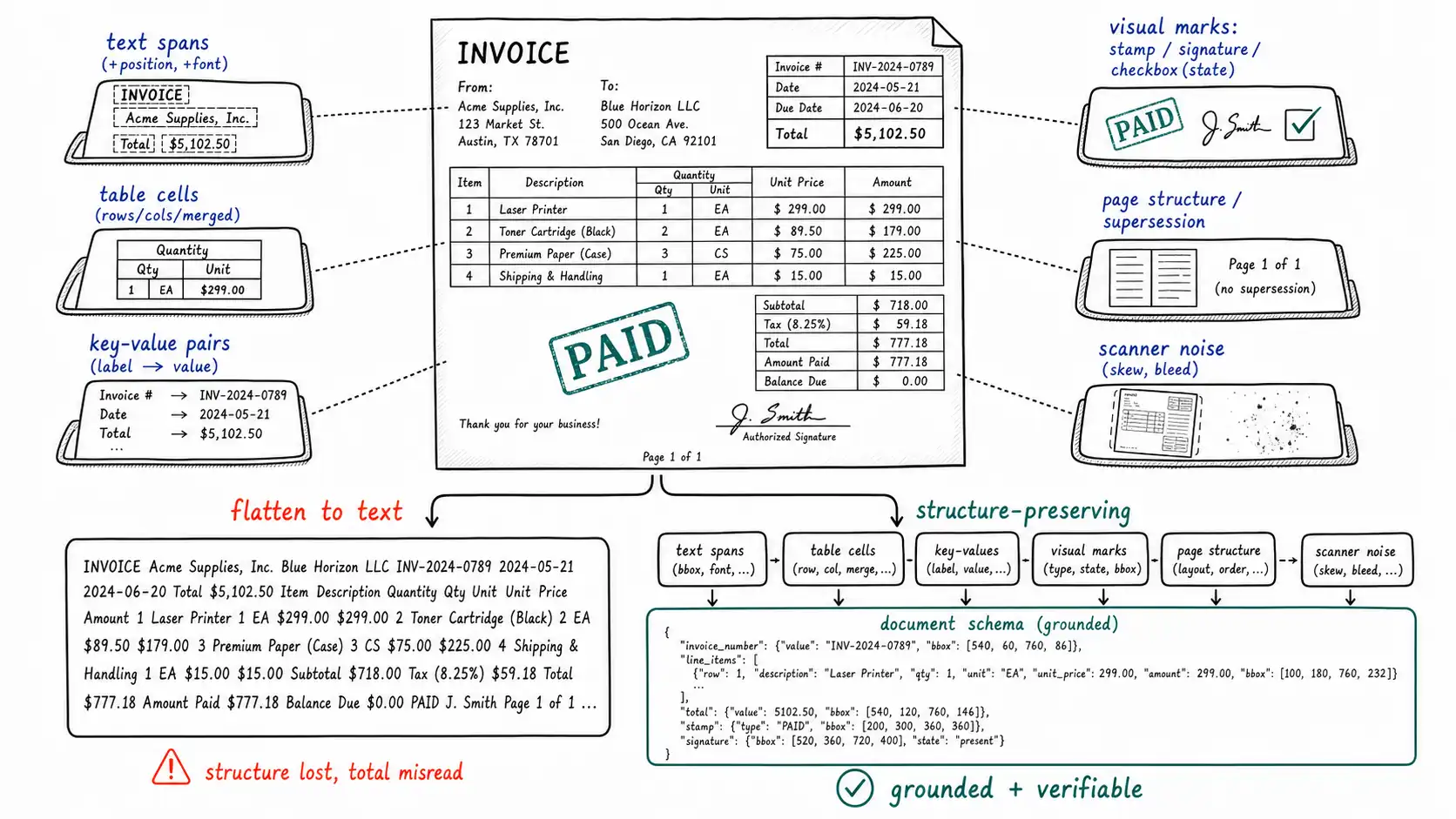
The anatomy of a document, named so you can preserve it
Before deciding how to process documents, enumerate what a document contains, because each element is a thing you can preserve or discard, and the discards are where the meaning leaks out.
- Text spans, each with a position on the page, a font size, and a style, the position and size matter (a large number top-right is probably a total; small gray text bottom is probably a footnote).
- Reading order, which is not always top-to-bottom-left-to-right, multi-column layouts, sidebars, and forms have a logical order that differs from naive raster order.
- Tables, with rows, columns, headers, merged cells, and spanning headers, a table is a 2D structure whose meaning is entirely in the cell relationships.
- Key-value pairs, the backbone of forms, a label ("Invoice Date") and its value, often spatially adjacent rather than textually adjacent.
- Visual marks: stamps (PAID, VOID, RECEIVED), signatures, checkboxes (and their checked/unchecked state), handwriting, logos, seals.
- Page structure: page order, headers, footers, page numbers, and the critical relationship of supersession (page 5 is an addendum that overrides page 2).
- Embedded media: a photograph inside a medical record, a chart inside a report, a diagram inside a manual.
- Scanner artifacts: skew, noise, bleed-through, fold lines, coffee stains, the photographed-at-an-angle warp of a phone capture.
Read this list as a preservation checklist. For your document type and your object of truth, which of these carry meaning you cannot afford to lose? An invoice: tables, key-values, page structure, sometimes a stamp. A contract: reading order, signatures, page supersession, and crucially the clause structure. A medical form: checkboxes (a checked vs unchecked box can be the entire diagnosis), key-values, handwriting, and embedded photos. Naming what matters is what lets you choose a pipeline that keeps it.
OCR, layout, and the four processing strategies
There are four broad ways to turn a document into something a model can reason over, and they trade off exactly the structure they preserve against cost and complexity.
| Strategy | What it preserves | What it loses | Good for |
|---|---|---|---|
| Plain OCR → text | Characters | All 2D structure, marks, order | Pure prose; never for forms/tables |
| Layout-aware OCR | Characters + positions + reading order + table cells | Visual marks (stamps, signatures) unless detected | Forms, invoices, structured docs |
| Whole-page image → VLM | The full visual gestalt; the model sees marks | Exact small text (resolution); no explicit structure | Quick QA; gist; low-stakes |
| Hybrid: layout OCR + page-image crops to VLM | Both: structure and visual marks at high res | Cost and pipeline complexity | High-stakes extraction (the right default) |
The first row is the trap that produced the linearized-invoice failure, and it is the most common pipeline because it is the easiest to build. The third row, "just send the page image to the multimodal model", is seductive because it is one API call and the model can see stamps and signatures the OCR pipeline might miss. But it inherits the resolution blind spot: small print, the digits of a total, the text in a dense table may not survive into the visual tokens (the GPT-4V system card is explicit about small-text and dense-detail weakness). The fourth row is the right default for anything high-stakes, and it embodies the chapter's thesis: use layout-aware OCR to recover structure and exact text, use the page image (and crops of it) to recover the visual marks and to let the model reason over the gestalt, and bring both to bear so each covers the other's blind spot.
A document ingestion schema that preserves structure
The schema is the artifact that makes preservation real. It is the contract for what every downstream step, chunking, retrieval, extraction, grounding, audit, is allowed to assume exists. Designing it before writing extraction logic forces the preservation decisions into the open.
from dataclasses import dataclass, field

@dataclass
class TextSpan:
 text: str
 page: int
 bbox: tuple[float, float, float, float] # normalized x, y, w, h
 font_size: float
 reading_order: int # logical, not raster, order

@dataclass
class TableCell:
 text: str
 row: int
 col: int
 row_span: int = 1
 col_span: int = 1 # merged cells preserved explicitly
 bbox: tuple[float, float, float, float] | None = None

@dataclass
class Table:
 page: int
 cells: list[TableCell]
 bbox: tuple[float, float, float, float]

@dataclass
class VisualMark:
 kind: str # "stamp" | "signature" | "checkbox"
 state: str | None # checkbox: "checked"/"unchecked"
 text: str | None # stamp text e.g."PAID"
 page: int
 bbox: tuple[float, float, float, float]

@dataclass
class Page:
 number: int
 image_uri: str # the original rendered page image
 width: int
 height: int

@dataclass
class Document:
 doc_id: str
 source_file_hash: str # provenance: which file this is
 source_uri: str
 page_count: int
 pages: list[Page]
 spans: list[TextSpan]
 tables: list[Table]
 marks: list[VisualMark]
 supersedes: list[str] = field(default_factory=list) # doc_ids this overrides
 superseded_by: str | None = None
Every field on this schema is a structure the naive text pipeline destroys. bbox everywhere is what makes grounding (Chapter 8) possible. reading_order separate from raster order is what would have kept the summary box from jumping ahead of its line items. TableCell. row_span/col_span is what preserves the merged tax header. VisualMark. state is what tells a medical-form reader the box is checked. source_file_hash ties every claim back to a specific file. supersedes/superseded_by is what stops the system answering from last year's form. A document represented this way is no longer flattened into a guess; it is a structured object a downstream step can extract from, ground against, and audit.
Chunking a document for multimodal RAG
When documents feed a retrieval system, the chunking decision is where structure is most often re-destroyed after being carefully preserved. The common mistake is to chunk the linearized text into fixed-size windows, which splits tables across chunks, severs key-value pairs from their labels, and strips the page image away entirely. The structure-aware alternative is to chunk along the document's own seams and to keep, for each chunk, a triplet of representations.
@dataclass
class DocChunk:
 chunk_id: str
 doc_id: str
 page: int
 # Three coordinated representations of the same region:
 text: str # layout-aware extracted text
 table_json: dict | None # structured table, if a table
 image_crop_uri: str # the pixels, for the VLM + for humans
 bbox: tuple[float, float, float, float] # where on the page (grounding)
 embedding: list[float] | None = None # for retrieval
A chunk is now a region of a page that carries its text (for keyword and reading), its table structure if any (for exact cell-level questions), and a crop of the actual pixels (so a vision-language model can read the marks and a human reviewer can verify). It also carries its bbox, so a retrieved chunk can be highlighted on the page. This triplet is the document-AI embodiment of the whole book: text for what's cheap and exact, image for what only pixels show, structure for what only arrangement means, and provenance binding all three to a location. Chunk on the document's seams (sections, tables, key-value blocks), not on a character count, and the retrieval system inherits the structure instead of fighting it.
When a screenshot beats text extraction, and when it does not
A recurring practical question deserves a direct answer. Sometimes the right representation of a document region is a high-resolution image crop sent to a vision-language model, not extracted text. This is true when the meaning is visual and resists linearization: a complex form where spatial layout is the meaning, a stamp or signature, a checkbox whose state matters, a handwritten annotation, a diagram, a chart. Here the pixels carry information the text pipeline cannot, and a crop preserves it.
But the screenshot is not better when the object of truth is character-exact and the text is small: a long account number, a dense table of figures, fine-print terms. There, the resolution blind spot bites, the model reads the crop fluently and gets a digit wrong, and a purpose-built OCR engine on the same region, verified per Chapter 3, is more reliable. The mature pattern uses both on the same region and reconciles them: OCR for the exact characters, the image crop for the visual context and marks, and a disagreement between them flags the region for review. The decision is not "screenshot vs text" globally; it is per region, driven by what that region's meaning is, which is, once more, the MODAL framework's "object of truth" doing its job.
Chapter summary
A document is a structured visual object, text-with-position, reading order, tables with merged cells, key-value pairs, visual marks (stamps, signatures, checkboxes and their state), page structure and supersession, embedded media, and scanner noise, and flattening it to plain text destroys the 2D arrangement that carries the meaning, which is why a flawlessly OCR'd invoice can still be understood wrongly when its summary box, merged headers, and grand total are linearized into a jumble. DocVQA and ChartQA exist because document and chart understanding is a visual reasoning task, not a character-reading task. Enumerate what a document contains as a preservation checklist tied to your object of truth, then choose among four strategies: plain OCR (the structure-destroying trap), layout-aware OCR (structure and order), whole-page-image-to-VLM (sees marks, loses small text to resolution), and the hybrid of layout OCR plus high-res page-image crops to a VLM: the right default for high-stakes work, where each representation covers the other's blind spot. Encode preservation in an ingestion schema whose every field (bbox, reading order, merged-cell spans, mark state, file hash, supersession) is a structure the naive pipeline would have lost, and chunk for retrieval along the document's own seams while keeping a triplet per chunk: layout text, table JSON, and a pixel crop, all bound to a bbox. A screenshot crop beats text extraction when meaning is visual and resists linearization, and loses to verified OCR when the object of truth is small character-exact text, so reconcile both per region rather than choosing globally. This chapter follows the embedding-space foundation from Joint Embedding Spaces and Their Limits; the next chapter sharpens the OCR vs. understanding distinction further: OCR Is Not Document Understanding.